Often times, when I post great deals from Amazon, I mention an additional discount if you order through Subscribe & Save or Aut0-Renewal. I’ve put together a Subscribe & Save Tutorial. Below you can find out about Subscribe & Save and Auto-Renewal and how to save more money by utilizing these services.
What is Subscribe & Save and Auto-Renewal?
They are both services set up by Amazon to send automatic shipments of items you need or to automatically renew your subscriptions at the end of the contract term. The intent is to help you avoid running out of items you may regularly use or to miss out on your favorite magazines.
The best features about Subscribe & Save are an automatic 15% discount on your purchase plus free shipping. Magazines purchased through Auto-Renewal are often also deeply discounted – saving you 80% and even more on your favorite titles. The great thing is that you can use either service to place your order and then cancel at any time.
HOW TO USE SUBSCRIBE & SAVE
When you find an item you wish to purchase, visit the Amazon Subscribe & Save store. All items you find listed here will qualify for Subscribe & Save.
As you find the item you want to purchase. For the purposes of this explanation, I am sharing a deal for Cottonelle Toilet paper.
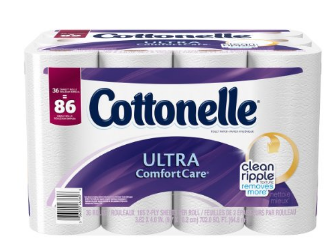
When you land on the product page, you will see something which looks like this in the pricing:
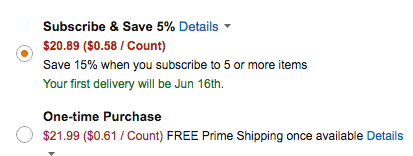
You can see that this item has Subscribe & Save built in, so you can instantly save 5% off of your purchase.
Next, look to see if there are an additional coupons you can apply to your purchase. They will be located directly below the price. Often times, they will automatically be checked to be applied, but other times, you may need to click to activate.
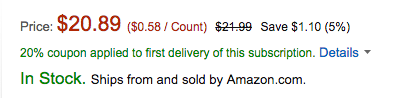
These coupons are great as they save you money on your very first purchase. Note that it is only applied to your first purchase and not any later shipments. It is a one-time discount.
If you wish to order, you will first want to select the frequency of the delivery (which is located directly below the price).
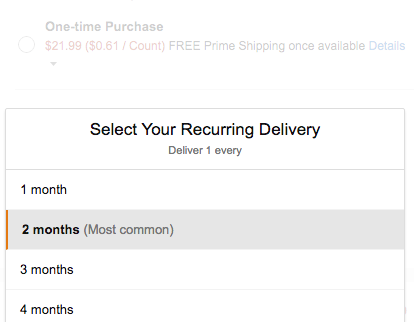
It will default to the most common setting (which in this case was 2 months). You can, however, change to shorten or lengthen the time between your shipment.s
Next, click on the Review Subscription button (this is how you add it to your cart and place your order).
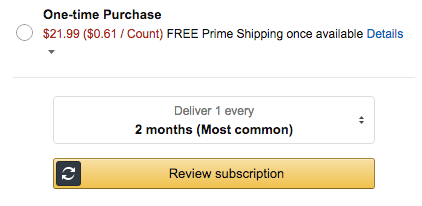
You will then click the orange subscribe now button and your order will be placed.
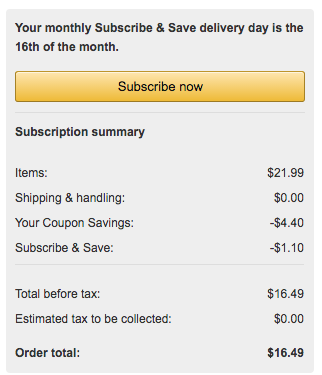
As you can see, we received a discount of $1.10 off of the original price by using Subscribe & Save. We also saved an additional 20% because of the coupon offer.
If you add a total of 5 or more Subscribe & Save items to your account for delivery in a single month, your 5% discount will automatically increase to 15% savings!
It is important to note that your order will not ship immediately. It will ship to you once a month – and will include all Subscribe & Save items in a single shipment.
HOW TO USE AUTO-RENEWAL
Auto-renewal is allowed on many magazine subscriptions offered by Amazon. It works in the same manner as Subscribe & Save.
When you open the magazine you wish to order, you may see an auto-renewal offer. The price is usually very low, which makes it a great deal:
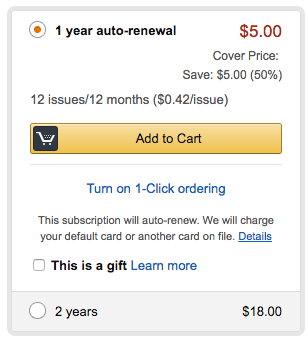
Just click on the add to cart button. Proceed as usual to checkout. When the magazine is up for renewal, you will be charged the current price for the second year and not the lower aut0-renewal rate. In this example, you will pay $5 for the first year. When it is time to renew one year from now, the price may be $20 for the year, so you will pay $20 for the second year.
One important thing to note about these magazine prices is that they are included in your purchase when trying to reach the $49 minimum shipping threshold.
CANCELING SUBSCRIBE & SAVE or AUTO-RENEWAL
Once you receive confirmation that your order has shipped, you will want to remember to suspend or cancel your future shipments/renewals.
Amazon will email you a couple of weeks before your order ships or your magazine renews. That will allow you plenty of time to edit your order so you are not charged for something you do not want to receive.
It is very simple to cancel this feature. It is imperative that you do not do this step until your order ships or you will cancel your current order.
First, log into your Amazon account. From there, you will look in the the Orders Section for Manage My Subscribe & Save Items or Manage Magazine Subscriptions:
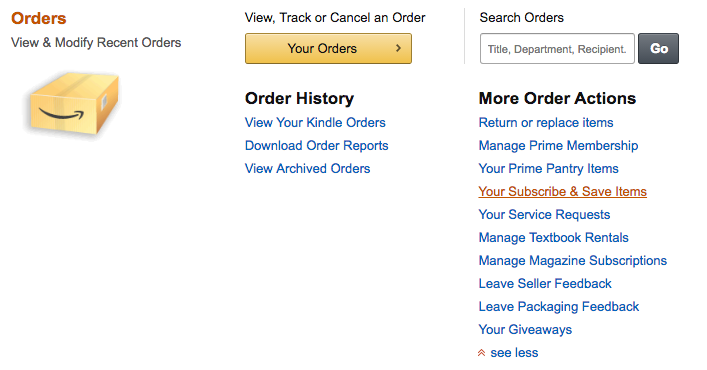
Cancel Your Subscription:
- Log into your Amazon account.
- Look at your Orders – specifically under More Order Actions. Find Your Subscribe & Save Items and click on this.
- You will see each product listed. Hover over the one you want to cancel and then click the EDIT button.
- When the window comes up, click on the Cancel Subscription link and follow the steps.
Skipping a purchase:
- Log into your Amazon account.
- Look at your Orders – specifically under More Order Actions. Find Your Subscribe & Save Items and click on this.
- You will see each product listed. Hover over the one you want to cancel and then click the SKIP button, which automatically skips that subscription only. (If you receive monthly, it will only skip that month).
- If you want to delay shipment even further, hover on the image and click the EDIT button.
- From here, click on change your schedule or quantity and edit accordingly.
You will do the same thing if you wish to cancel a magazine auto-renewal. Just select the magazine set to renew and cancel your order.